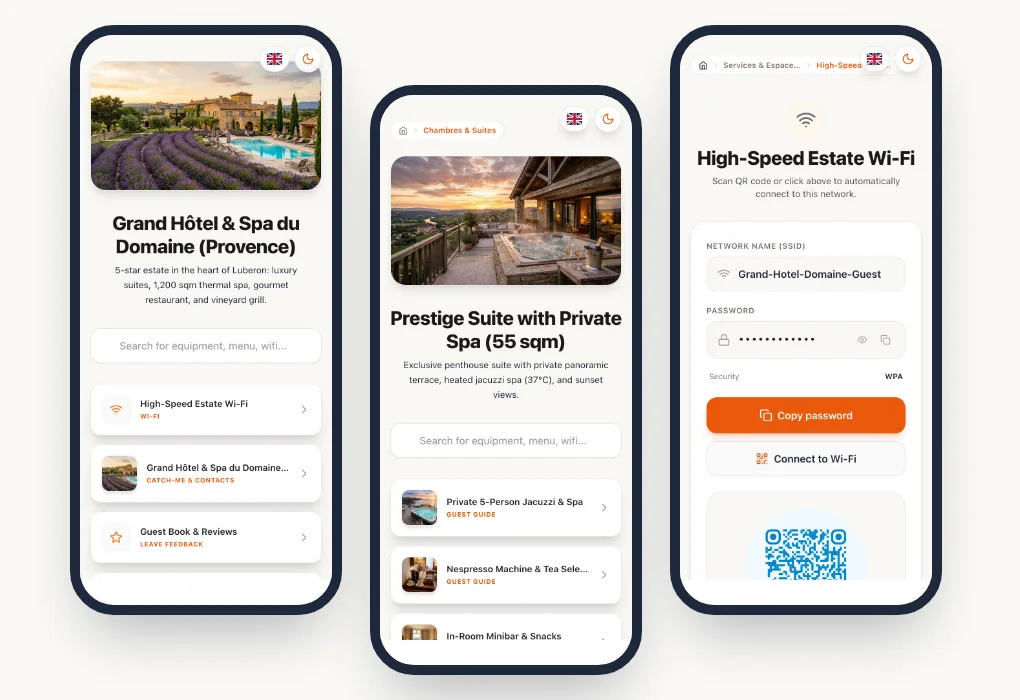
Whether you own a single vacation rental or run a concierge service managing dozens of properties, welcoming guests is the pivotal moment of your business.
It is at this exact moment that guest experience, overall ratings on booking platforms (Airbnb, Booking.com), and... your operational mental load are decided.
Yet, most accommodations still rely on outdated formats: aging paper binders, endless emails, or static PDFs that are impossible to read on smartphones.
This guide explains how to build a digital welcome book that actually helps: what it should contain (with text templates you can reuse), how it complements Airbnb's built-in guidebook, where to place the QR codes in the property, and how to keep it up to date without spending your evenings on it.
1. Why paper welcome books and PDFs no longer work
Most guests arrive tired after hours of travel. They will not take the time to leaf through a 20-page binder sitting on a dresser.
The main limits of traditional formats:
- The language barrier: A welcome book written in a single language is useless to guests who speak English, Spanish or German.
- Hard to find the right information at the right time: Searching for the Wi-Fi code or the location of the bins in the middle of a long document is frustrating.
- Rigid updates: The key box code or the Wi-Fi password has changed? You have to reprint and replace the pages by hand.
- A constant stream of messages at all hours: When information is not one tap away, the guest's first reflex is to message or call the host.
💡Did you know?
Most questions guests ask their hosts always come back to the same topics: the Wi-Fi, the air conditioning or heating, the kitchen appliances and the check-out procedure.
2. What is a connected digital Airbnb welcome book?
A digital welcome book is a smooth, responsive web interface that guests can open immediately, without downloading a third-party mobile app.
Guests reach it in two very simple ways:
- Before the stay: through a dynamic link sent in the pre-arrival message.
- On site: by scanning a QR code placed in the property.
┌───────────────────────────────┐
│     DIGITAL WELCOME BOOK      │
└──────────────┬────────────────┘
               │
┌──────────────┴──────────┬─────────────────────────┐
▼                         ▼                         ▼
[ ARRIVAL INFO ]     [ APPLIANCE GUIDES ]      [ LOCAL GUIDE & TIPS ]
• Times & access     • QR code per appliance   • Recommended restaurants
• Door code / keys   • Video tutorials (A/C)   • Emergency numbers
• Wi-Fi connection   • Waste sorting           • Transport & parking
3. Is Airbnb's built-in guidebook enough?
Airbnb gives you space in the listing for check-in instructions, the Wi-Fi details, the house manual and the house rules. Use it: it is where guests look first before they arrive.
But that guide lives inside the Airbnb app. Once in the property, guests have to reopen the app, find their reservation, then the right section. And it only covers Airbnb bookings: guests who booked through Booking.com, another site or directly with you cannot see it.
What a digital welcome book adds on top:
The right approach is to use both: the essential arrival information in Airbnb, and a link to the full welcome book in the pre-arrival message and in the house manual.
4. The essential elements of a successful welcome book
To be effective, your welcome book should organise information in a clear, concise hierarchy:
A. Access and arrival information (check-in)
- Exact address with a direct GPS link (Google Maps / Waze).
- Parking instructions (space number, badge, street restrictions).
- Clear instructions for the key box or smart lock (with photos or a short video).
B. How the property and its appliances work
- Simple Wi-Fi connection (a button to copy the password, or a QR code to connect instantly).
- How to use the heating, air conditioning and thermostat.
- Recycling instructions and where the bins are.
- House rules (no smoking, quiet hours, pets).
C. The local guide and the host's recommendations
- Your 3 to 5 favourite restaurants in the neighbourhood.
- Nearby shops (bakery, supermarket, pharmacy).
- Must-see activities and off-the-beaten-track tips.
D. The check-out procedure
- Latest check-out time.
- Departure instructions (returning the keys, switching off the lights, dishes).
5. Text templates you can reuse
A good welcome book can be read in seconds. Here are three short templates to adapt. Replace the items in square brackets.
Self check-in
Welcome! You can arrive from [4 pm].
- Park in space no. [12], on level -1 (the badge is in the key box).
- The key box is to the right of the front door. Code: [sent on the day of your arrival].
- The apartment is on the [3rd floor], door on the left. Any problem? Call me on [your number]. I answer from [8 am to 10 pm].
Wi-Fi
Network: [PineHouse]. Password: [copy it below]. The router is in the TV cabinet. If it stops working, unplug it for 10 seconds, then plug it back in.
Check-out
Check-out is before [11 am]. Before you leave:
- start the dishwasher if it is full;
- take the rubbish to the bins in the courtyard ([yellow: packaging, green: glass]);
- close the windows and switch off the air conditioning;
- put the keys back in the key box and scramble the code. Thank you for staying with us, and safe travels!
Three principles make these texts work: one action per line, numbers and codes that stand out, and a single person to contact, with their hours.
6. Safety and practical information not to forget
This information is rarely read, but guests must be able to find it in seconds on the day they need it:
- Emergency numbers: 112 works from any phone across Europe. In the United States and Canada, dial 911; in the United Kingdom, 999 or 112. Add the local numbers for the police, ambulance and fire brigade.
- Where to find the smoke detector, the fire extinguisher if there is one, the electricity meter and the main water valve.
- The nearest pharmacy and doctor, with out-of-hours details if possible.
- What to do if something breaks down: power cut, leak, locked door, with your number and that of a local contact if you live far away.
Many countries and cities require short-term rentals to be registered, and the registration number must often appear on every listing. In France, for example, this is set out in article L324-1-1 of the Tourism Code. Rules vary from one city to another: check with your local authority. A welcome book is not a legal requirement, but it is the right place to remind guests of the building rules and of the local recycling instructions.
7. The concierge services' secret weapon: QR micro-guides for each appliance
A central welcome book is essential, but what happens when the guest is standing in front of the dishwasher or the heat pump at 11 pm? They will not necessarily reopen the full welcome book.
The recommended practice: place a discreet QR code directly on the 3 or 4 most complex appliances in the property:
- The air conditioning / heat pump: simplified instructions (to avoid hot/cold confusion).
- The induction hob or oven: how to turn off the child lock.
- The spa / hot tub: how to use it and start it up.
By scanning this specific code, the guest lands directly on the appliance's page, with its instructions translated into their language and a 20-second explainer video.
There is no need to rewrite the manufacturer's manual: import the PDF, keep the three or four steps that matter during a stay, and add a short video filmed with your phone.
8. Where to place your QR codes in the property
A QR code nobody sees is useless. A few spots work particularly well:
For printing, allow at least 3 cm (about 1.2 in) per side for a QR code scanned from a few dozen centimetres, a strong contrast (dark code on a light background) and a durable material: a laminated or vinyl label for the kitchen and bathroom.
With a dynamic QR code, the printed address never changes. You can edit the content of the page, or even point it somewhere else, without reprinting anything.
9. Translating your welcome book for international guests
There is no need to translate into every language. Look at where your guests come from (your booking history shows it) and start with the three or four most frequent languages, often English, German, Spanish, French or Italian depending on the region.
Have the sensitive information checked: codes, times and safety instructions must stay accurate in every language. Also avoid slang and puns, which translate badly.
10. Keeping the welcome book up to date
An outdated welcome book does more harm than no welcome book at all: one old key box code and your evening is ruined. Make a habit of reviewing it:
- after every change of code, Wi-Fi password or appliance;
- at the start of each season, for shop opening hours and local recommendations;
- after every recurring question from a guest: if you are asked twice, the answer is missing from the welcome book.
The scan statistics of your QR codes also show which appliances raise the most questions, and which countries your guests come from.
11. How to create your digital welcome book in 2 minutes with Pliyos
With a smart platform like Pliyos, creating your welcome guide requires no technical skills:
- Import your existing document: Simply upload your current Word or PDF file. Pliyos AI automatically extracts the sections and structures your pages.
- Activate multilingual translation: the Airbnb Solo plan includes your original language plus 4 translation languages, chosen from more than 100 (€1 per month for each extra language). You can also have your existing PDF or Word guide translated, one-off, for €5 per language (excl. VAT).
- Add your videos: Embed YouTube or Loom tutorials to illustrate your appliances in a few clicks.
- Download print-ready QR codes: Print your welcome stand for the entrance and your labels for the appliances.
Frequently asked questions
Does the guest need to download an app? No. The welcome book opens in the phone's browser, by scanning the QR code or tapping the link sent before arrival.
Can I send the welcome book before arrival? Yes, and it is recommended. Add the link to your pre-arrival message, and repeat the most important access information directly in the message.
Do I need one welcome book per property? Yes, as soon as the access, the appliances or the neighbourhood differ. Shared sections (house rules, check-out, city recommendations) can be reused from one property to the next.
What if the guest has no mobile signal? Display the Wi-Fi QR code near the entrance: once connected, the guest can open the welcome book. Also keep the arrival information in the message sent before the stay, which they can read offline.
Conclusion: Save time while increasing your 5-star reviews
A digital welcome book is not just a tech gadget: it is a real productivity tool for hosts and the promise of a stress-free stay for your guests.
By removing friction from the moment they arrive, you drastically reduce support messages and maximise your chances of getting perfect ratings on your listings.
To go further, discover our welcome book solution for Airbnb and short-term rentals, or read our tips to improve your guests' welcome.
To give your welcome book the look of your property, read our article on creating a personalized Airbnb welcome guide. Running a hotel or a guesthouse? See our guide to the digital hotel welcome guide.