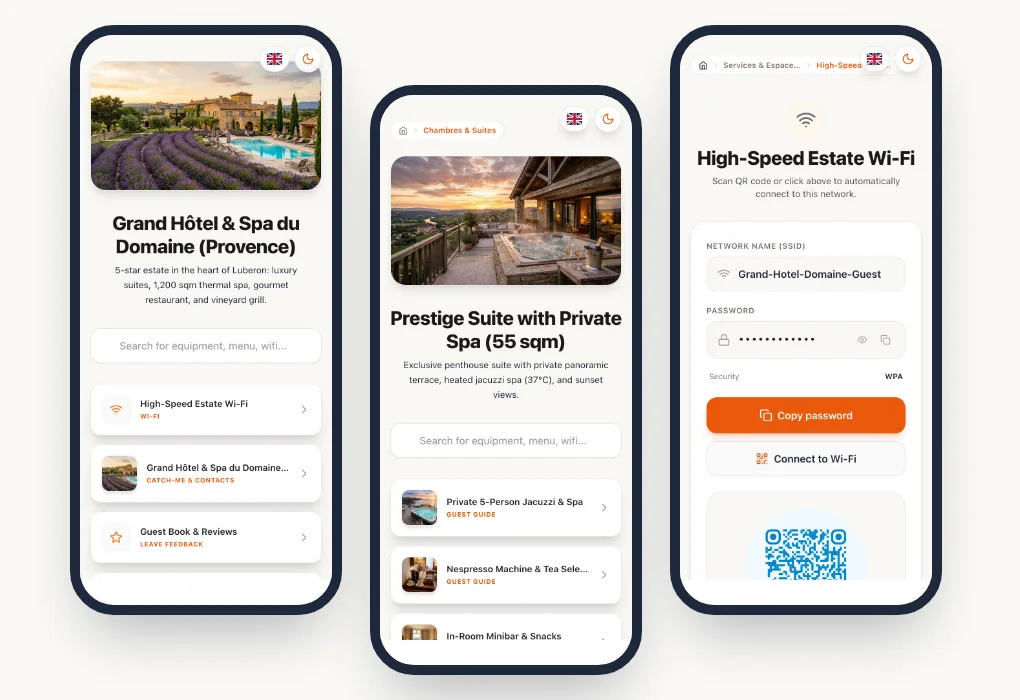
A generic welcome guide copied from a template answers the simplest questions. A personalised guide does more: it walks guests through your home, with your equipment, your instructions and your favourite places. That is what makes guests feel expected, and it is often what they mention in their reviews.
Here is what to put in your Airbnb welcome guide, and how to make it both personal and easy to keep up to date.
In short
A good Airbnb welcome guide follows the guest's journey: arrival, settling in, the stay, then check-out. It shows your equipment with photos or videos, shares your favourite places and reads in the guest's language.
Follow the guest's journey
The simplest way to organise your guide is to follow the stages of the stay, in the order guests need them.
Before and during arrival
This is the most stressful moment for guests, especially with self check-in:
- the exact address and a visual landmark (door colour, intercom number);
- access: key box code, door code, floor, mailbox location;
- parking: car park, reserved space, areas to avoid;
- arrival times and who to contact if something goes wrong.
Photos of the entrance and the key box prevent many 11 pm phone calls.
Settling in
Once inside, guests always look for the same things:
- Wi-Fi, with a button to copy the password or connect directly;
- heating or air conditioning;
- hot water and the fuse box;
- the sheets, towels and supplies provided.
During the stay
- How to use the equipment: oven, hob, dishwasher, washing machine, TV, jacuzzi.
- House rules: noise, smoking, pets, number of guests.
- Waste sorting and collection days, a frequent source of confusion for international guests.
- Your local recommendations.
Check-out
- Check-out time and what you expect: dishes, bins, linen.
- Where to leave the keys.
- A note inviting guests to share their experience.
Equipment guides with photos and videos
This is the part that saves the most time. Rather than a long written explanation, a photo of the button to press or a 20-second video showing how to start the jacuzzi is enough.
Stick a small QR code directly on the appliance (washing machine, oven, air conditioning): guests scan it and land straight on that equipment's guide, in their language.
Videos can be hosted on YouTube or Loom and embedded in the guide. Film them with your phone without aiming for perfection: what matters is that the gesture is clear.
Make it personal with your recommendations
Your favourite places are what make your guide unique. A few ideas:
- the nearest bakery and its opening hours;
- your favourite restaurants, with a word on what to order;
- the market, shops and the on-duty pharmacy;
- activities: walks, beaches, museums, family outings;
- insider tips only locals know.
A personal note at the start, with your first name and a photo, also changes the tone of the guide a lot.
Translate it for international guests
On Airbnb, a large share of guests come from abroad. A guide in one language leaves them guessing how your equipment works, with the risk of misuse.
With a digital guide, guests choose their language and see all the content translated. At Pliyos, the Airbnb Solo plan includes your original language plus 4 translation languages, chosen from more than 100. If you already have a guide in PDF or Word format, you can also have it translated one-off, for €5 per language (excl. VAT).
Keep the guide up to date
A personalised guide is only valuable if it is accurate. The key box code changed, the bakery closed, the Wi-Fi password is different: with a digital guide and dynamic QR codes, you edit the content online and the QR codes already stuck on remain valid.
Use your guests' feedback: if a question keeps coming back, information is missing from the guide.
Create your guide with Pliyos
With the Pliyos welcome guide for Airbnb, you start from your existing guide or a blank page, add equipment guides with photos and videos, enable your languages, then print your QR codes.
The Airbnb Solo plan costs €9 per month per listing (excl. VAT), with up to 5 QR codes. Each additional listing costs €7 per month and adds 5 QR codes. The trial is free, without a credit card.
For a complete overview, read our guide to digital Airbnb welcome books.
Frequently asked questions
Do guests need to install an app?
No. They scan the QR code with their phone's camera, and the guide opens in the browser.
Can I send the guide before arrival?
Yes. The guide also has a link you can share in the booking platform's messaging, so guests can prepare their arrival.
How many QR codes do I need?
One main QR code at the entrance for the guide, then one per piece of equipment that deserves a guide. For a typical apartment, 3 to 5 QR codes are often enough.