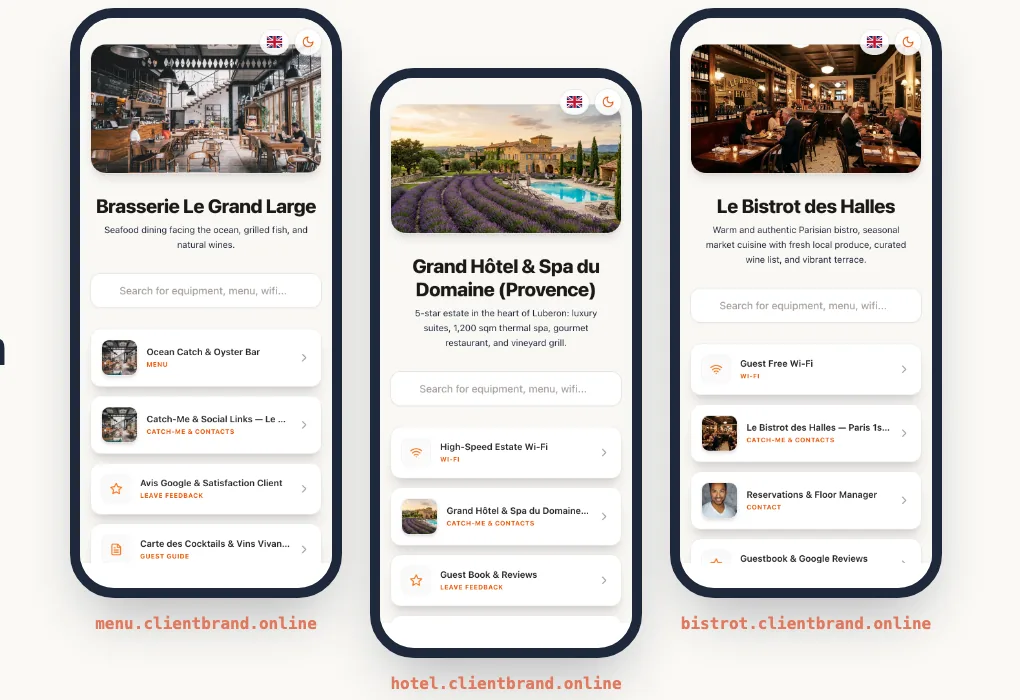
The physical QR code has gone through a real transformation: it is no longer a simple static bridge to a web page, but a dynamic, measurable and customisable marketing infrastructure.
For communication agencies, marketing firms, franchise networks and multi-site enterprises, managing hundreds of printed materials raises major challenges: protecting the client's brand image, adapting the destination in real time and delivering flawless engagement reports.
This guide explains what white-labeling really covers, how to set up a subdomain with a CNAME record, how routing by country and language works, and how to organise, measure and print campaigns for several clients.
The Power of White-Labeling: Complete Ownership of Your Domain Name
When a customer scans a QR code on a billboard or retail packaging, an unbranded or third-party URL (e.g., bit.ly or generic redirection services) damages credibility and dilutes brand equity. With Pliyos, redirections can run under your own custom domain names (e.g., qr.your-brand.com). Explore our dedicated white-label QR code platform for agencies and enterprises.
1. Why standard QR codes fall short
Static QR codes and basic generators have three critical limits for professionals:
- The destination cannot be changed after printing: a wrong link or a new menu or catalogue means reprinting every physical medium.
- No contextual routing: the same QR code printed on international packaging should send a Spanish visitor to a Spanish page and a French visitor to the French version.
- No separation between clients: mixing data from several brands or subsidiaries in a single account makes reporting tedious and unprofessional.
2. What "white label" means for a QR code
A QR code contains a web address. When visitors point their phone at the code, the camera shows that address before the page even opens. White-labeling means that this address, and then the landing page, carry your client's name rather than the name of the tool you use.
In practice, three elements can carry your brand:
- The address encoded in the QR code, visible in the camera preview.
- The address of the landing page, visible in the browser bar.
- The content of the page: logo, colours, no mention of the tool.
This relies on a dedicated subdomain (qr.brand.com, scan.brand.com, menu.brand.com) rather than the main domain. The brand's website stays completely independent: only the subdomain is delegated, through a simple CNAME record in the DNS.
3. Two white-label approaches, depending on your goals
White-labeling adapts to the reality of your materials and campaigns:
For all content created and hosted by Pliyos (professional vCard, instant Wi-Fi connection, Google review forms, menus or link profiles): the physical QR code uses our short link (qrdir.app/xyz) for a minimal module density (very large, well-spaced squares). The scan is instant even in dim light or from a distance, and visitors land directly on your custom web address (e.g. page.yourcompany.com) with your logo.
For redirections to external campaigns (e-commerce, websites, app stores): the physical QR code directly encodes your own domain name (e.g. qr.yourcompany.com/campaign). Ideal for billboard campaigns, packaging and major brands whose guidelines require their own domain to appear right in the smartphone camera viewfinder.
How to choose
The shorter the encoded address, the fewer modules (the small squares) the QR code contains, and the bigger each module is at the same print size. That is what makes a code readable from a distance, in poor light or on a small label.
- Choose option 1 for materials read up close or in difficult conditions: table stands, product labels, business cards, shop windows.
- Choose option 2 when the brand requires its domain to appear from the very first scan, or for advertising campaigns where trust matters: billboards, packaging, direct mail.
One constraint to know before printing: the domain encoded in a QR code can no longer change once printed. The destination, on the other hand, can be edited at any time. So decide on the option before you send anything to print. To review the basics, read our article on static vs dynamic QR codes.
4. Setting up your subdomain with a CNAME, step by step
The delegation is done at the domain's registrar or DNS host (GoDaddy, Namecheap, Cloudflare, OVH, etc.). You need neither a server nor a certificate to buy.
- Choose the subdomain: short, readable and unambiguous, for example
qr.brand.com. - Add the record to the DNS zone: type
CNAME, nameqr, targetcname.pliyos.com. - Declare the domain in Pliyos, in the relevant client's workspace, and specify its use (hosted portal or QR code redirection).
- Wait for validation: DNS propagation takes from a few minutes to a few hours depending on the registrar. The HTTPS certificate is then issued and renewed automatically.
Do not add a CNAME on the main domain (brand.com): most registrars do not allow it, and it would take the brand's website offline. Always use a subdomain. If the client already has a record on that subdomain (A or CNAME), delete it before adding the new one.
An agency can organise this in two ways: one subdomain in its own name for all campaigns (qr.your-agency.com), or one subdomain per client (qr.prestige-client.com). The second requires access to the client's DNS, but it is the one that delivers a true white label.
5. Key features of the Pliyos infrastructure
Redirections run on Cloudflare's edge network, as close as possible to the visitor, under your own web address.
The visitor's country and phone language are detected to redirect automatically to the right local URL.
A single universal scan sends users to the Apple App Store or Google Play depending on their smartphone.
A structured organisation by brand or subsidiary, with a dedicated domain name and secure invitations for client collaborators, with role management (analytics Viewer or independent Editor).
6. Smart Routing: one QR code, several destinations
Smart routing saves you from printing a different QR code for each market. On every scan, the destination is chosen in this order:
- The visitor's country, detected from their connection: if you have set a URL for that country, they are sent there.
- Their phone's language: if there is no country rule, the browser's preferred language is used.
- The default URL, if no rule matches.
A few typical use cases:
- Packaging sold in several countries: the same packaging leads to the online shop of the country where it is scanned.
- International trade show: a German visitor lands on the German brochure, an Italian visitor on the Italian version.
- Cross-border franchise network: a single code on the point-of-sale materials, and each country manages its own page.
- Mobile app: a "Download the app" QR code sends iPhones to the App Store and Android phones to Google Play.
Always prepare a polished default URL: it is the page visitors from countries you have not listed will see.
7. Formats designed for every professional use
- Web, e-commerce and custom tracking redirections (UTM & pixels): Send your scans to any web page, online shop or product page. Easily add your campaign tracking parameters (
utm_sourceUTM tags, promo codes, Meta, Google, TikTok and LinkedIn pixels) to measure your conversions precisely, and change your target URLs at any time without ever reprinting. - Employee and company vCards: Let your contacts instantly save a complete contact card (with logo, contact details, opening hours and directions) straight into Apple Contacts or Google Contacts.
- Instant Wi-Fi connection: Ideal for restaurants, hotels, dealerships or trade shows, with no password to type.
- Google review campaigns: A targeted redirection to your business profile to boost your local reputation.
- Catch Me & rich profiles: A real link hub to showcase a company's social networks, forms and special offers.
All generated QR codes can be customised with your brand guidelines (central logo, custom colours, eye shapes) and exported as HD vector SVG for perfect sharpness at the printer.
UTM parameters and pixels: two different uses
- UTM parameters are added to the destination URL (
?utm_source=poster&utm_medium=qr&utm_campaign=spring). They let you find the visits coming from the QR code in Google Analytics or in the client's CRM. Use a differentutm_sourcevalue for each medium to compare posters, flyers and packaging. - Advertising pixels fire at the moment of the scan, before the redirection, to build retargeting audiences on Meta, Google, TikTok or LinkedIn.
In Europe, placing advertising trackers generally requires the visitor's consent (GDPR and the ePrivacy Directive), and similar rules exist in other regions. Before turning on pixels for a campaign, check the setup with your client and their data protection officer.
8. Managing several clients without mixing data
As soon as you manage more than two or three brands, a clear organisation saves a considerable amount of time:
- One folder per client or subsidiary, with its own subdomain: its QR codes, statistics and exports stay separate.
- Naming conventions: prefix each QR code with the medium and the campaign (
BB-spring-station,PKG-organic-range). Exports and filters become instantly readable. - The right access levels: invite the client's collaborators as Viewers so they can follow their scans live, or as Editors so they can change their destinations themselves. They only see their own workspace.
9. Monitoring and exporting campaign performance
The Pliyos Analytics workspace gives you full visibility on the impact of your print investments:
- Cross-filtering with checkboxes: Compare the engagement of several QR codes or several clients at the same time.
- Peak-hour identification: Analyse busy times to synchronise your marketing operations.
- Full CSV export: Download time-stamped scan logs to feed your BI dashboards or your client reports in Looker Studio and Excel.
Each row of the export is one scan, with the date (UTC), the QR code, its short code, the client, the country, the city, the device type, the browser, the operating system and the language.
For a useful client report, three indicators are often enough: the number of scans per medium (which poster works), the breakdown by day and hour (when people scan), and the breakdown by country or city (where the campaign reaches). Then cross-check with the conversions measured through UTM parameters.
10. Print best practices for campaigns
A badly printed QR code wipes out the benefit of the whole campaign. Before a print run:
- Size: a common rule of thumb is a side of at least one tenth of the scanning distance. A code read from 2 metres (about 6.5 ft) should be about 20 cm (8 in) wide; on a label read from 30 cm (1 ft), 3 cm (1.2 in) is enough.
- Contrast: a dark code on a light background. Avoid light codes on dark backgrounds and colours that are too close, which some phones read badly.
- Quiet zone: leave an empty margin all around the code, with no text or image.
- Logo: a central logo is possible, but keep it reasonably small and always test the result.
- Real-world test: print a proof at the final size and scan it with several phones (iPhone and Android), at the planned distance and in the lighting of the venue.
- Call to action: write next to the code what visitors will get ("Scan to discover the range", "Menu and allergens"). A code with no explanation gets far fewer scans.
11. Which plan to choose
The Pliyos Enterprise plans differ mainly by the number of QR codes, custom domains and collaborators:
Current prices are shown on the pricing page.
12. How to get started in 3 steps
- Choose your Enterprise plan: based on the number of QR codes and CNAME domains you need.
- Connect your subdomains: add a CNAME record to your DNS zone pointing to
cname.pliyos.com(the SSL certificate is issued automatically). - Create your workspaces and deploy: generate your first dynamic QR codes and follow their scans live.
Frequently asked questions
Can I use each of my clients' domains? Yes. Each custom domain is attached to a client folder. The number of domains depends on your plan.
Will my clients see the Pliyos name?
With full white label (from Enterprise Scale), the landing page carries the client's logo and domain. With option 1, the short qrdir.app address remains visible in the camera preview; with option 2, the client's domain appears from the very first scan.
Can a QR code already printed with qrdir.app switch to my domain?
No: the address encoded in a printed QR code does not change. Its destination, however, can still be edited. To show your domain from the first scan, you need to generate and print a new code.
Do I need an SSL certificate? No. The HTTPS certificate for your subdomain is issued and renewed automatically once the CNAME record has been validated.
What happens if I change a QR code's destination? The change applies from the next scan, with no reprinting. The QR code's statistics are kept.
Ready to Deploy White-Label QR Codes for Your Clients?
Set up your first CNAME delegation in a few minutes, connect your advertising pixels (Meta, Google, TikTok, LinkedIn) and give your clients a white-label experience.
👉 Discover the Pliyos White-Label QR Code Platform — Free trial, no credit card required.