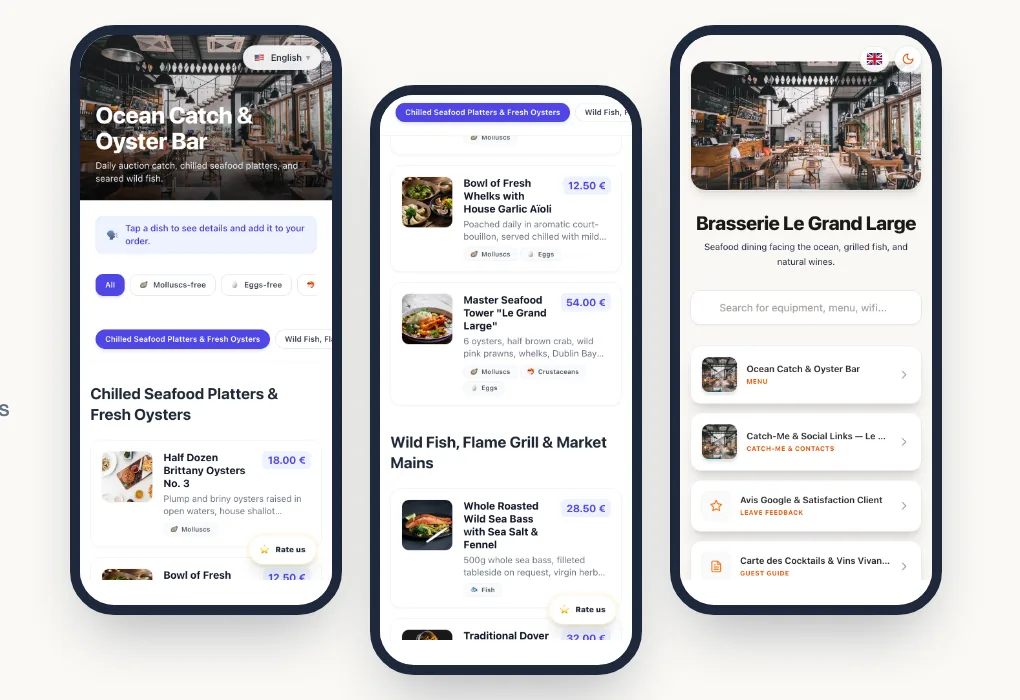
For a long time, QR code menus had a bad reputation: an unreadable PDF forced on guests with no alternative. Today, well-designed digital menus feel more like an app than a scanned document, and they solve very concrete problems for restaurants.
Here is what digitising your menu changes day to day, and the limits to keep in mind.
In short
A digital menu cuts reprints, updates in seconds, shows allergens dish by dish and reads in the guest's language. It works best when it complements service rather than replacing it.
1. No more reprinting at every change
A price increase, a dish leaving the menu, a new dessert, a change of season: with a paper menu, every change means a reprint or pen corrections that look careless.
With a dynamic QR code, you print your materials once. Changes are made online, from a computer or a phone, and guests see them immediately. The QR code doesn't change; only the menu evolves.
2. A menu that is always accurate
The gap between the menu and reality is a frequent source of irritation: the dish is no longer available, the price has changed, the special is only written on the chalkboard.
A digital menu lets you hide a sold-out dish in one click, add a special in the morning and remove it in the evening, or have a lunch menu and a dinner menu. Guests read a menu that matches what the kitchen can actually serve.
3. Showing allergens effortlessly
The rules require restaurants to inform guests of the 14 major allergens present in each dish. On paper, this usually means a table that is hard to read and rarely up to date.
On a digital menu, each dish carries its allergens, and guests can filter the menu by what they cannot eat. With Pliyos, AI suggests allergens from your dish descriptions.
Allergens suggested by AI must always be checked and approved by the restaurant before publishing. Only you know your recipes and suppliers.
The detailed requirements are explained in our article on the INCO Regulation and allergens.
4. Welcoming international guests
A tourist who can't understand the menu orders less willingly, or not at all. A digital menu reads in the guest's language: they choose it when they open the menu and see dishes, descriptions and allergens translated.
You manage a single menu, and every language updates at the same time. Our article on menu translation for tourists explains how to choose your languages.
5. Showing your dishes at their best
A description doesn't say everything. A photo helps guests decide, especially for specialities they don't know or dishes to share. On a digital menu, photos cost nothing to add and can be changed at any time. With Pliyos, the media library automatically collects your dish photos from your website, your TheFork page or a PDF, so you only have to match them to each dish.
6. Knowing how your menu is used
A dynamic QR code counts scans: how often the menu is opened, at what times, from which countries, on which devices. This data, collected without cookies, helps you check that a language is really useful, spot a badly placed QR code or measure terrace activity.
7. Bringing other services together
The same digital space can host guest Wi-Fi, your social media, bookings and a Google review QR code inviting guests to share their experience. Guests find everything in one place, and you manage a single tool.
The limits to know
A digital menu is not a miracle solution, and it's better to know that before starting:
- Not every guest wants to use their phone. Keep a few paper menus, especially for older guests or those whose battery has run out.
- The network must keep up. In a basement or a room with poor coverage, offer guest Wi-Fi that is easy to join.
- A PDF behind a QR code is not a digital menu. That bad experience is what gave QR code menus their poor reputation.
- The menu must be kept up to date. An inaccurate digital menu is worse than a slightly old paper one.
- Local rules on displaying prices still apply, as for any restaurant.
Where to start?
The simplest way is to start from your current menu: a photo, a PDF or your website address. With Pliyos, AI imports your dishes and prices; you check them, approve allergens, add your photos and print your QR codes.
For every step in detail, read our complete guide to QR code menus, or try it directly from the QR code menu for restaurants page, free and without a credit card.